 .
.
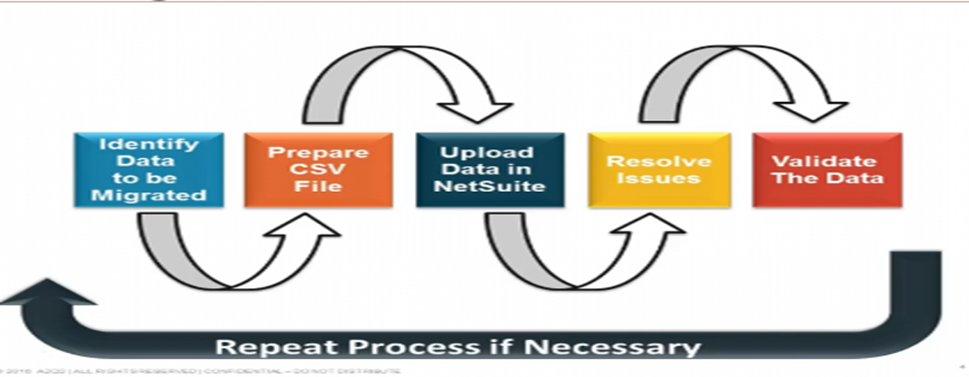
Data Migration as the term coined itself denotes migration of data from on source to another.
Straight-forward as it might seem, this entire process involves heavy change in data structure and storage based on the application it is being migrated to. Regardless of the exact purpose of data migration, we have to carry the entire process with at-most precision to enhance performance and productivity of data taken along.
While the migration to the foreign system can be divided into various approaches, the steps to be undertaken in executing them have to remain same!
And that brings us to the re-requisites of NetSuite Data Migration activities as follows:
6 NetSuite Data Migration Checkpoints to Knock Out
1.Know, Audit and Cleanup the Data to be Migrated
The data to be migrated needs to undergo a complete systems audit to highlight the duplicates, closed contracts, line sequence numbers and missing trail heads.
Once we identify the exact data issues can we scrub and cleanup the data before pushing it to next ERP.
This maintains data quality and integrity of information being processed into NetSuite.
2. Define and Design the Migration
The design phase is where organizations define the type of migration to take on — big bang or trickle. This also involves drawing out the technical architecture of the solution and detailing the migration processes.
- Big Bang Migration – Full Data Transfer within a limited window of time – More cost and risk
- Trickle Migration – Completion of the migration activity into phases – Complex as done in phases.
3. Identify the Data Types for Import
NetSuite classifies data into Master Data and Transaction Data.
These can be broadly classified in Entity, Transaction, CRM, Item and Custom records as follows:
- Classification Records – Chart of Accounts, Subs
- Entity Records – Customer, Vendor, Partner, Employees etc.
- Transaction Records – Journal Entries, SO, PO, Banking etc.
- CRM Records – Campaigns, Emails, Pre-sales directory etc.
- Item Records – Items, Pricing, Discounts etc.
- Custom – Anything not covered in the above heads.
4. Determine the Import Options
There are various options to move your data into the NetSuite Eco-System which depend on your business needs and the existing resources to pull in this data as follows:
- Manually type in data
- Import using the CSV templates
- Third Party Integration tools
- Bundles
- Web services – which write codes to move in data
Choose whatever fits best.
5. Link Internal and External Ids
NetSuite auto-generates unique ids for each and every record and transaction. This ID is exclusive and cannot be over-written manually.
To have a corresponding ID to suit your business process, we can have an External ID attached to records to identify the historical data migrated into NetSuite.
6. Verify and Validate the Data Migrated
Conduct a live test once the real data gets into the system using these External IDs and cross compare data in the two parallel systems.
Once the implementation runs live, get up a system to audit the data to ensure accuracy of the migration activity.
If the organization is small, we can use various excel audit templates and formulas like Index Match and VLOOKUP to verify the migrated data too.
Thus, while increasingly, organizations are migrating some or all of data to cloud in order to increase their speed to market, improve scalability, and reduce the need for technical resources, the pillars to this migration remain the same – Confidentiality, Integrity and Availability.
And with NetSuite, we can secure all our data in the most precise manner thus creating authentication at all levels.

