

Official sponsor of Oracle-NetSuite SuiteWorld 2025 in Las Vegas, October 6–9! 🎉.

Handling of Capital Work In Progress in NetSuite

a line of dominos falling on top of financial paperwork

Companies generally have a requirement of building a Fixed Asset over a period of time (i.e. Building / Plant & Machinery) and therefore they want to track the billing components against a particular job and once the asset is developed completely they want to recognize it within the Property, Plant & Equipment and start recording its Depreciation.

There can be multiple ways of handling this requirement within NetSuite, I would like to demonstrate the steps that can be followed, to ease the handling and ability to manage Capital Work In Progress requirement within the Fixed Assets Management Module.

Steps to Managing Capital Work In Progress Within NetSuite

Step 1: Setting up Capital Work In Progress Account

Navigate to Lists > Accounting > Accounts > New and create an account by entering details like Account Number, Account Name, Account Type, and Subsidiary details as per below screenshot:

undefined

Step 2: Create the Non-Inventory Item / Items for components that need to be purchased for Capital Work In Progress

Navigate to Lists > Accounting > Items > New and create Non-Inventory Item for Purchase and enter details like Name, Unit of Measure, and Expense Account as ‘Capital Work In Progress’ as created in step 1, under the preferences Tab, set the checkbox for ‘Can be Fulfilled/Received’ as True as per your business need.

Step 3: The user either may directly create a Vendor Bill for the purchase of components to be used in the development of the Asset or may proceed with the Purchase Order Process, for the sake of simplicity, I would directly create Vendor Bills for it.

For creating the Vendor Bill, Navigate to Transactions > Payables > Enter Bills, and provide details like Vendor, Memo (Specifying the Job Number), and Item (as created per step 1).
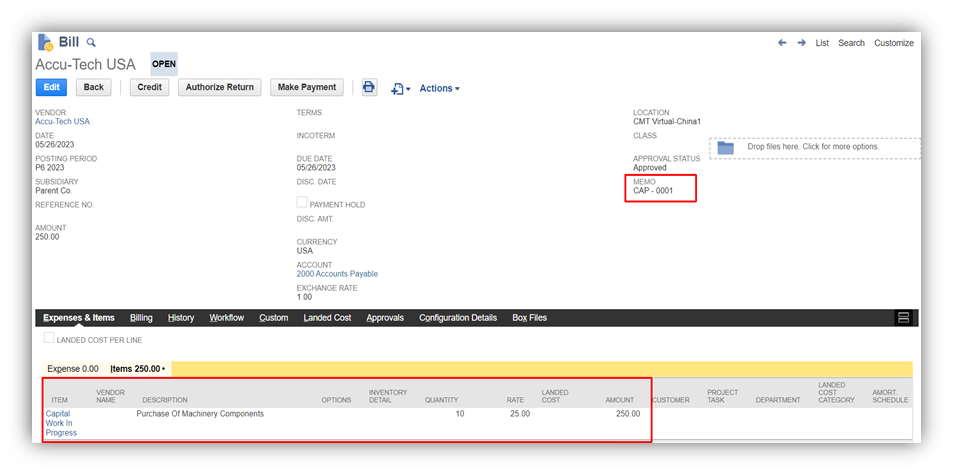
undefined

Recorded Bill leading to following GL Impact:

undefined

Record all bills related to Capital Work In Progress in the same manner as mentioned in this step.

Step 4: Create the saved search report to track the Capital Work In Progress against the particular Job like below. The report will provide results for costs accumulated against a particular Job after applying the filter for the Job on it.

undefined

Step 5: When the Asset is ready, and needs to be capitalized, the user may proceed to post the following general entry in the system as per the nature of the Fixed Asset with the amount as accumulated to that Job (Refer to Step 4).

undefined

Step 6: After recording the above entry, this will be available for Asset Proposal Screen to generate Fixed Asset out of it and that entry would be linked to Fixed Assets enabling to trace back the history of components used in the development of such Asset, by searching the memo of JE to the saved search report as mentioned in Step 4.


Trending Articles

Thinking about Independent Consulting? OdeCloud vs. Anderson Frank & the likes
The Essential Consulting Expertise Guide for 2025
NetSuite Revenue Management Across Multiple Industries
High-Level NetSuite Training Available in OdeCloud NetSuite Community
Work Remotely and Travel the World: The Perks of Being a Freelancer

Trek Travel Streamlines Travel Protection Integration with OdeCloud’s experts

Looking to streamline your operations with more automations? Keith shares an OdeCloud project.

#netsuite

#integrations

Project Outcomes

This new integration system transformed our travel protection service.

  1. Efficiency Gains: Completely automated the process, eliminating the need for monthly roster reconciliation.
  2. Enhanced Guest Experience: Guests benefited from a smoother booking process with transparent travel protection options tailored to their needs.
  3. Accuracy in Pricing: The integration ensured precise calculations based on complex variables.
  4. Scalability: The system can easily accommodate future growth and changes in travel protection offerings.

Background

Our company offers guests the option to protect their travel investments through a travel protection plan. This service is crucial, as it provides coverage in cases where guests need to cancel their trips due to unforeseen circumstances such as illness or emergencies. However, the process for managing this service was previously cumbersome and inefficient, requiring manual coordination and reconciliation with the travel protection partner.

Challenge

We needed a seamless integration within NetSuite to handle complex calculations for travel protection costs. The solution needed to account for multiple variables, including:
Guest-specific factors such as age and location.
Travel details like destination, total cost, and type of coverage (e.g., pre-trip hotels, post-trip hotels, flights).
Dynamic pricing calculations based on these variables.

Before partnering with OdeCloud, the process was manual and error-prone, involving monthly exchanges of rosters between our team and the travel protection provider. This created inefficiencies and delayed customer service.

Solution

OdeCloud worked with us to design and implement a fully integrated travel protection solution within NetSuite. Key features of the solution included:


1. API Integration: OdeCloud enabled real-time communication with the travel protection partner’s API. This allowed us to dynamically calculate the cost of travel protection based on the guest’s specific details.
2. Seamless Booking Experience: The integration allowed the travel protection cost to be automatically added as a line item to guest bookings within NetSuite.
3. Flexible Adjustments: Guests could easily add or cancel travel protection directly through NetSuite without requiring interaction with third-party systems.
4. Eliminating Manual Processes: The previously manual reconciliation process was replaced with automated inline API transactions, eliminating errors and saving significant time.

Conclusion

This integration is one of the most impactful projects we’ve undertaken, and it holds a special place in our transformation journey. With OdeCloud’s expertise, we achieved a solution that not only streamlined operations but also elevated the guest experience. This project exemplifies the power of technology in solving complex business challenges and enhancing customer service.